AI Advisor
An AI advisor that reads the plan and proposes fixes you can review
Select a statement in a trace and ask. The advisor sends the statement, the captured event details and the execution plan to the language model you configured, then shows a diagnosis and a table of concrete recommendations.
14-day trial · no account · no card
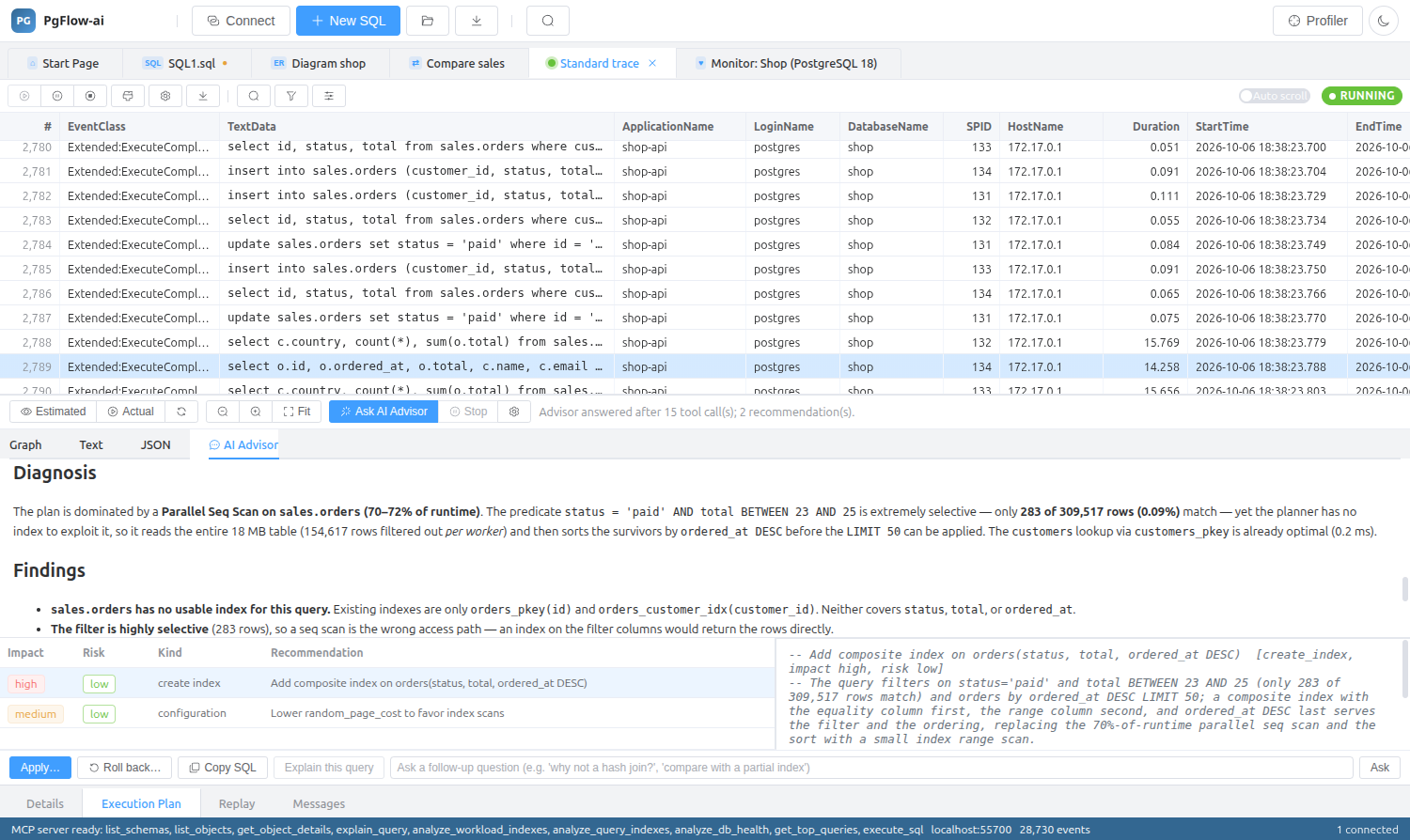
Recommendations you can act on
Each recommendation has a kind (create, drop or alter index, query rewrite, statistics, configuration, vacuum), the SQL, a rollback statement, an impact and a risk rating.
- Apply… shows the SQL for editing and confirmation, then runs it on the traced server
- Roll back…, Copy SQL, and Explain this query for rewrites
- After a change, the plan is re-run and the cost and execution time are compared before and after
- Follow-up questions keep the conversation context
It looks at the live database, read-only
The model inspects the database through a PostgreSQL Model Context Protocol server started for each question with the trace’s connection string, in read-only mode by default. Built-in read-only tools (schemas, tables, column statistics, indexes, settings, EXPLAIN and ad-hoc SELECT) are always available too, so it works even without uvx or npx.
- Postgres MCP Pro (default; hypothetical indexes when hypopg is installed), mcp-postgres-server, or a custom command
- The model never executes DDL or DML itself: every change goes through the Apply dialog
Your provider, your key, only when you ask
Configure it under Tools ▸ AI Settings. Nothing is sent anywhere until you press Ask AI Advisor, and then only to the provider you chose.
- Anthropic Claude, OpenAI, Google Gemini, DeepSeek, Kimi and Qwen
- Any OpenAI-compatible endpoint (LM Studio, vLLM, …)
- Ollama Cloud or a local Ollama
- Refresh list fetches the provider’s live model list; Test connection sends a one-word prompt
AI Assistant in the SQL editor
Outside the profiler, the SQL editor’s AI Assistant generates, explains, optimizes and fixes SQL with your schema as context.
AI Advisor: questions
Is an AI subscription included?
No. You bring your own provider and API key, or run a local model with Ollama. PgFlow-ai talks to that provider directly.
What data is sent to the model?
When you ask, the statement, the captured event details and the execution plan, plus whatever the read-only database tools return while the model investigates. Nothing is sent unless you press Ask.
Can the AI change my database?
Not on its own. The default database tools are read-only, and every suggested change is shown in the Apply dialog for you to edit and confirm, with a rollback statement next to it.
Can I use a local model?
Yes. Choose a local Ollama, or any OpenAI-compatible endpoint such as LM Studio or vLLM.
Related features
Try it on your own database
Download PgFlow-ai and press “Start free trial” in the app. 14 days, every feature, no account and no card.