Schema & Data Compare
Compare schemas and data, then synchronize
Point Schema Compare at a source and a target, see what is only in one side or different, read the DDL side by side, and generate the script that synchronizes them. Data Compare does the same for table rows.
14-day trial · no account · no card
Schema Compare
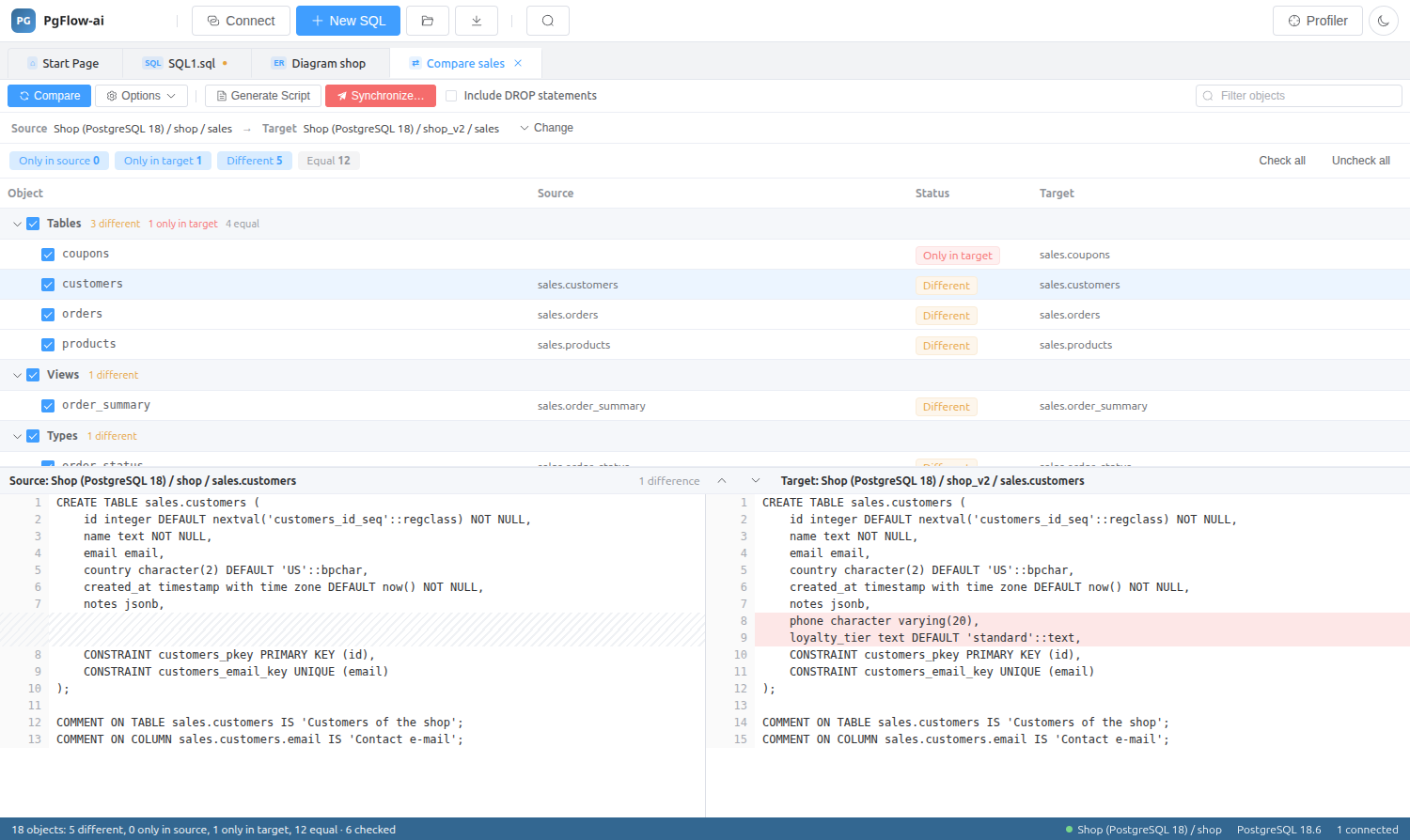
Objects are grouped by type (tables, views, types and more) and marked Only in source, Only in target, Different or Equal. Select one to see both definitions side by side with the differences highlighted.
- Check or uncheck objects to include in the sync
- Generate Script to review the changes, or Synchronize to apply them
- Optionally include DROP statements
- Filter objects by name
Data Compare
Compare the rows of tables in two databases and generate the statements that synchronize the target. Useful for reference data, configuration tables, or checking that a migration copied everything.
Schema & Data Compare: questions
Can I compare databases on different servers?
Yes. Source and target are any two connections you have in the Database Explorer.
Does Synchronize run without showing me the SQL?
You can use Generate Script to review the exact statements first, and choose whether DROP statements are included.
Related features
Try it on your own database
Download PgFlow-ai and press “Start free trial” in the app. 14 days, every feature, no account and no card.