Database Diagram
See and shape your schema
An ER diagram with auto layout and crow’s-foot relationships, a Table Designer that writes the ALTER or CREATE script as you go, and a visual Query Builder.
14-day trial · no account · no card
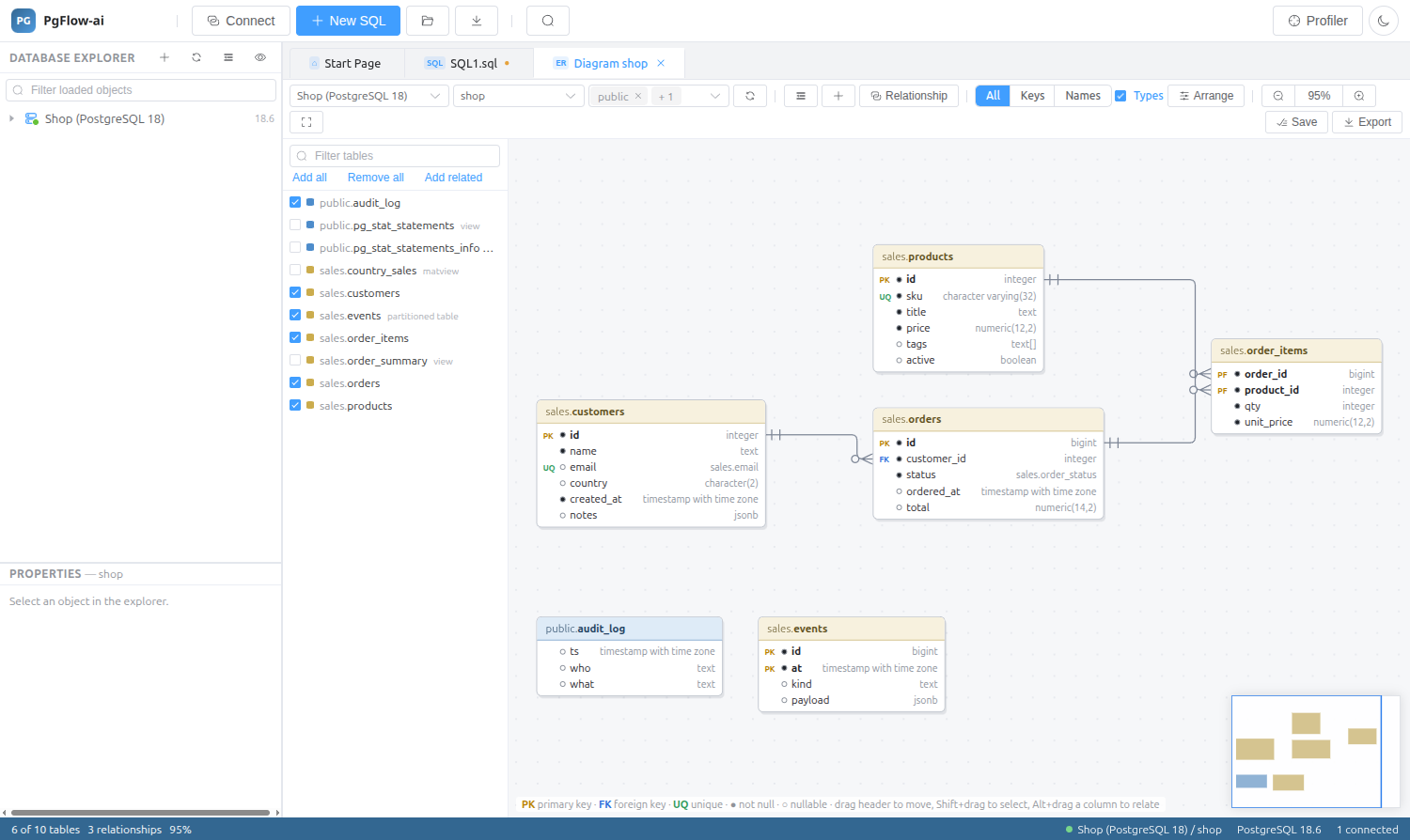
Database Diagram
Add the tables you care about (or all of them, or a table and its related ones) and let auto layout arrange them.
- Crow’s-foot relationships, primary, foreign and unique keys marked
- Draw a foreign key by dragging between columns
- Show all columns, keys only or names only, with or without types
- Export to PNG or SVG
Table Designer
Edit columns, constraints, indexes and table options in one place. The live ALTER or CREATE script is shown before anything is applied.
Query Builder and scripting
Build SELECT statements visually with joins, grouping and criteria. Every object has Script As CREATE, DROP, SELECT, INSERT, UPDATE and DELETE, plus an object viewer with its definition, properties and dependencies.
Database Diagram: questions
Can I export the diagram?
Yes, as PNG or SVG.
Does the Table Designer change the table immediately?
No. It shows the generated ALTER or CREATE script so you can review it before applying.
Related features
Try it on your own database
Download PgFlow-ai and press “Start free trial” in the app. 14 days, every feature, no account and no card.